Wallet - Digital Card Wallet
- 4.7
- Rating
- 1.00M
- Installs
- Free
- Price
 Analysis by App-foxy
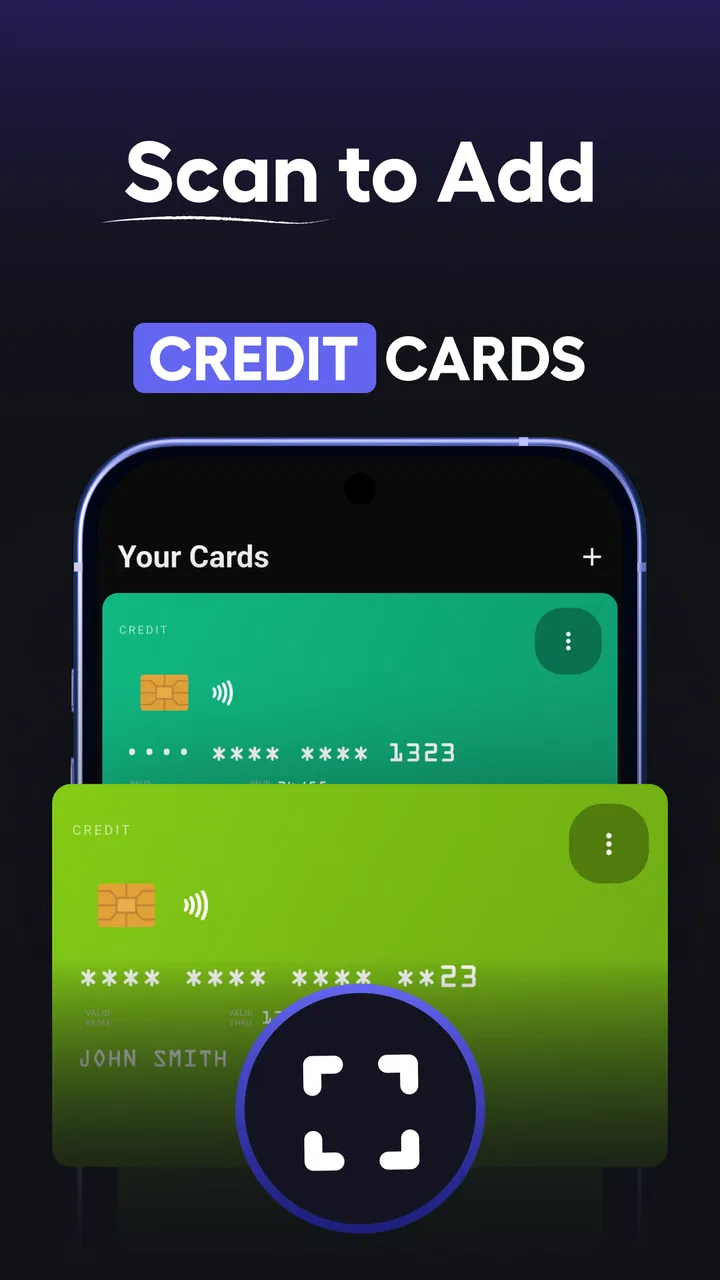
I use my phone as the place where I keep almost everything I need when I leave home, so a wallet app has to do more than look tidy. It needs to open quickly, show the right card without confusion, and reduce the small bits of friction that appear when I am standing at a checkout, scanning a loyalty code, or trying to find an old membership card. Wallet - Digital Card Wallet, developed by Wallet Assistant, takes a focused approach: it brings credit cards, barcodes, and loyalty cards together in one digital wallet instead of leaving them scattered through screenshots, email messages, and physical pockets.
After spending time with it, I see the app as a practical tool for people who want a cleaner way to organize cards, rather than as a complete replacement for every payment method. That distinction matters. It can make everyday access much easier, but it does not magically turn every stored card into a contactless payment card. Its strongest value is organization and quick retrieval, while its usefulness depends on how many of your cards can actually be represented by a barcode or stored card entry.
How the wallet feels in everyday use
The current version is 6.2.5, and the overall experience feels mature enough for a simple utility. The first impression is straightforward: this is a tools app built around keeping card information in one place. I do not have to search through my photo gallery for a loyalty barcode or remember which email contained a membership number. Once the cards are arranged, the app becomes a small personal catalog that I can open when I need it.
You May Also Like

 Blood Strike: 2.5 Anniversary
Blood Strike’s Loadouts Turn Every Drop Into a Tactical Gamble
A close look at Blood Strike’s custom loadouts: how fast access to signature weapons reshapes its battle royale rhythm, rewards preparation, and narrows the gap between fights.

 Pandora - Music & Podcasts
Pandora’s Music Is Easy to Start, but Harder to Recover
Pandora’s strength is its low-effort path from a seed to a station. Its weak spot is how much confidence it asks you to place in connection, setup, and quiet recovery.

 8 Ball Pool
 Is Built on Rivalries, Rematches, and Routine
A close look at the rivalries, rematches, shared routines, and unanswered safety questions that turn a quick pool match into a persistent mobile community.

 Samsung Music
’s Quiet Strength Is Playing What You Already Own
Its reach comes less from spectacle than from dependable access to a personal library. That simplicity is both the app’s strongest retention engine and its ceiling.

 AccuWeather: Weather Radar
AccuWeather Review: A Quick, Clear Forecast for Everyday Decisions
For everyday plans, the best forecast is the one you can understand quickly. AccuWeather makes rain timing, radar, and local conditions easy to act on, with a few trade-offs.

 Hill Climb Racing
Why Hill Climb Racing Still Turns Crashes Into One More Run
A tiny car, a bumpy hill and one more upgrade: Hill Climb Racing keeps resurfacing because its simple chaos makes every near-miss feel personal.
More From Our News Desk



The best everyday scenario is a busy shopping trip. I may have a supermarket loyalty card, a pharmacy barcode, a gym membership card, and a store rewards card. Carrying the physical versions is annoying, while saving screenshots creates a messy collection with no useful order. In this app, each card has a clear place, so I can open the relevant entry, present the barcode, and move on without scrolling through unrelated images.
That sounds simple, but simplicity is exactly the point. A digital wallet should not make me navigate a complicated dashboard before showing the code I need. The usefulness comes from reducing repeated decisions: I do not need to ask myself where I saved a card, whether the screenshot is current, or which image belongs to which store. The app turns those loose items into something I can browse intentionally.
It is also helpful for people who regularly switch between several cards. Someone who travels, shops at different chains, or belongs to multiple clubs can keep those cards together without filling a physical wallet. Families may also find it useful for organizing cards that are used by different members, although I would label each entry carefully so that the wrong barcode is not presented at the counter.
The app is free to install, which makes it easy to try without committing money first. It is rated for Everyone, and its broad purpose is easy to understand even if you are not especially comfortable with smartphone tools. The developer is Wallet Assistant, and the app has passed the point where it feels like an obscure experiment: it has more than a million installs, with a 4.7 average from roughly twenty-three thousand ratings.
Those figures suggest that many people find the basic idea useful, but I would not treat popularity as a substitute for checking your own routine. If you only carry one or two cards and already use a phone payment service for everything else, a separate wallet may feel unnecessary. If you carry a collection of barcodes and membership cards, the benefit becomes much more obvious.
What it handles well
The app’s central strength is separation. A screenshot is just an image, but a card stored in a wallet has context. When I save a loyalty card, I can identify it by the organization rather than relying on a tiny logo or a date in a filename. That makes the difference between “I think this is the right code” and “I know which card I am opening.”
Barcodes are particularly well suited to this kind of app. They are often the part of a membership card that matters at the checkout, and keeping them in a dedicated place avoids the glare, cropping, and accidental zooming that can make a gallery image awkward to scan. I still recommend checking the screen brightness before reaching the register, especially in bright stores, because a perfectly organized card is not helpful if the scanner cannot read the display.
Credit cards require a little more care in how I think about them. The app can help me keep card information visually organized, but it should not be confused with a bank’s secure payment app or a phone’s contactless payment system. I would use it as a convenient reference for cards I carry, not as permission to abandon the original banking app, the physical card, or the payment method required by a particular terminal.
This is one of the most important practical distinctions for new users. A barcode-based loyalty card and a payment card are not interchangeable. A store may accept a displayed membership barcode but still require a bank card or a supported mobile payment service for the purchase. The app can put both types of card in the same general place, but the checkout process may treat them very differently.
Small habits that make the collection easier to use
I would set up the wallet gradually rather than importing every card in a single rushed session. Start with the cards used every week, give them recognizable names, and test each barcode at a normal checkout or self-service machine when there is no pressure. This catches problems such as a card image being too dim, a code being incomplete, or an old membership card being saved by mistake.
A useful habit is to put the most frequently used cards where they are easiest to recognize, then remove duplicates. Duplicate entries are more dangerous than an empty wallet because they create hesitation at the exact moment when speed matters. If a retailer has separate cards for rewards and payment, label the difference clearly instead of giving both nearly identical names.
I also recommend treating the app as a living list. When a store replaces a card or changes the account behind it, update the entry rather than assuming the old image will remain valid. This is a quiet advantage over a folder of screenshots: the dedicated wallet encourages me to notice which cards are active and which ones no longer belong there.
Another practical tip is to keep a backup method for important cards. A phone battery can run low, a screen can become difficult to read, or a store scanner can reject a displayed barcode. The app is most useful when it removes clutter, not when it becomes the only way to access something essential. For a gym, travel membership, or payment card that I cannot afford to lose access to, I would still keep the original option available.
What the current release means for users
The current release gives the application a more established feel than a bare barcode viewer. Version 6.2.5 is the version I would evaluate today, and that matters because wallet utilities live or die by small details: whether cards remain easy to find, whether the interface stays understandable as the collection grows, and whether the app feels dependable during a rushed moment. I would not choose it because of one flashy feature; I would choose it because the core workflow is direct.
The app has been available since August 10, 2023, so it is not a brand-new arrival. Its development appears to have moved toward maintaining a useful, focused product rather than trying to become a full banking platform. That is a sensible direction. Every extra layer added to a wallet can make it slower or more confusing, while the basic job—store and present cards—benefits from restraint.
For existing users, an updated version is most valuable when it preserves the collection they have already built and keeps the everyday path familiar. A wallet app becomes more valuable over time because the user has invested effort in naming and arranging cards. Any change that makes those entries harder to locate would undermine the whole purpose. My advice is to update normally, but after a major change, quickly check the cards you use most often before relying on the app in a busy setting.
The free model also shapes the experience. The app can be used without an upfront purchase, but it includes in-app purchases ranging from $9.99 to $69.99 per item. I would look at the payment screen carefully before confirming anything, especially if I only need a basic card organizer. The right question is not whether paid options exist, but whether the extra value matches the size of my collection and how often I use the wallet.
For a light user, paying may be difficult to justify. If I have three loyalty cards and rarely open them, the free experience may already cover the main reason I installed the app. A heavier user who wants a more comfortable long-term setup may see more value in optional upgrades, but I would still judge them by the specific functions offered at the moment of purchase rather than assuming that a higher price automatically means better security or broader payment compatibility.
Where it fits beside the usual alternatives
The most obvious alternative is the physical wallet. Physical cards work without battery power, network access, or a bright screen, and they remain the safest fallback for cards that are important. Their weakness is bulk. They also make it harder to carry many loyalty cards without turning the wallet into a stack of plastic.
Another alternative is the phone’s built-in payment wallet. That option is usually better for supported contactless payments, bank-issued cards, and tightly integrated checkout experiences. I would choose that kind of service when my main goal is tapping to pay. I would choose this app when my main problem is the collection of barcodes and membership cards that do not belong in a payment-focused wallet.
Saving screenshots is the quickest competing method, but it becomes unreliable as the number of cards increases. Images lack useful organization, and a screenshot may not show whether the card is current. A notes app can store names and numbers, but it is slower when I need a barcode immediately. This wallet sits between those options: more structured than a gallery or notes page, but less universal than a full payment platform.
That middle position is both its strength and its limitation. It is a good companion to a payment wallet, not necessarily a replacement for one. I would happily use the two together: the built-in payment service for tap-to-pay cards, and this app for loyalty codes, membership cards, and other visual card details. Trying to force one app to handle every kind of card usually creates more confusion than convenience.
Important limitations before you move everything over
The first limitation is dependence on the phone. If the battery is empty or the device is unavailable, the digital collection is unavailable too. This is not a reason to reject the app, but it is a reason to keep a physical backup for cards that matter in emergencies. A wallet organizer improves access under normal conditions; it does not remove the need for basic preparation.
The second limitation is acceptance. A displayed barcode may work perfectly at one retailer and fail at another because scanners, card formats, or store procedures differ. I would test the cards I use most before throwing away the physical versions. The app can display what I saved, but it cannot guarantee that every business will accept a phone screen as a substitute.
Privacy is another point I would consider before storing sensitive card details. The app’s purpose naturally involves information connected to cards, so I would avoid entering anything I do not need for the intended workflow. For a loyalty barcode, saving the usable card representation may be enough. For financial cards, I would be more conservative and continue using the bank’s official app or a supported payment wallet for transactions and account management.
The paid options may also create a moment of uncertainty for people who only want a basic organizer. Because the app is free to start, I would pay attention to what is available without an upgrade and decide whether the additional purchase improves my actual routine. A larger collection does not automatically mean every premium option is necessary.
Finally, people who expect automatic synchronization across every device should think about how they want to manage their collection before relying on it. The simplest setup is one main phone with a carefully maintained wallet. If I use multiple devices, I would verify that my preferred cards are accessible where I need them rather than assuming that every entry will appear everywhere exactly as expected.
Who should use it and what I would watch next
I would recommend Wallet - Digital Card Wallet to someone whose physical wallet is crowded with loyalty cards, barcodes, and membership cards. It is especially suitable for people who already use a phone at checkout and want a dedicated place for these items instead of a gallery full of screenshots. It can also help anyone who regularly changes bags, travels between stores, or wants a clearer separation between payment cards and reward cards.
I would skip it if I mainly need contactless payments, bank account controls, transaction history, or a replacement for an official financial app. In that situation, a built-in payment wallet or the card issuer’s own application is the better first choice. I would also skip it if I rarely carry cards digitally and do not mind keeping a small physical wallet; adding another app would not solve a real problem.
For new users, I would begin with a small test collection. Add a frequently used loyalty card, give it a name that is obvious at a glance, raise the screen brightness when presenting it, and confirm that the scanner reads it. Once that works, add the rest. This approach is safer than transferring everything at once because it reveals whether the app fits your local stores and your own habits.
What I would watch in future releases is not a long list of flashy additions. I would care most about the stability of saved cards, a fast path to frequently used entries, clear handling of sensitive information, and a transparent explanation of what paid options provide. Those are the areas that determine whether a wallet remains useful after the novelty fades. For existing users, preserving a dependable collection should matter more than changing the appearance every few months.
My final view is positive but specific. This is a focused organizational tool, not a universal payment solution. Its free entry point, Everyone age rating, broad card support, and established user base make it easy to try, while the current 6.2.5 release gives it a credible foundation for everyday use. I like it most as a companion to a normal payment wallet: it handles the loyalty and membership clutter that other wallets often leave behind.
If your real problem is too many cards rather than too few payment options, this app is worth trying. Keep a backup for essential cards, test important barcodes before relying on them, and review any in-app purchase with your own usage in mind. Used that way, Wallet - Digital Card Wallet can make the small, repetitive moments of shopping noticeably easier without pretending to replace every tool already on your phone.
FAQs for Wallet - Digital Card Wallet
01What is Wallet - Digital Card Wallet used for?
Wallet - Digital Card Wallet is designed to keep digital versions of your loyalty cards, membership cards, coupons, tickets, and similar passes in one organized place. After adding a card, you can usually display its barcode or QR code at the checkout or entrance. It is especially useful for reducing the number of physical cards carried in your wallet and finding frequently used cards more quickly.
02Can I add any loyalty or membership card to Wallet - Digital Card Wallet?
In most cases, you can add cards that contain a barcode, QR code, card number, or other readable membership information. The app may support scanning a code with your phone camera or entering the details manually. However, compatibility can vary between card providers, and some cards may require a specific format or may not work if their barcode is restricted to the provider’s official application.
03Does Wallet - Digital Card Wallet work without an internet connection?
Many stored cards can generally be displayed offline once they have already been added to the wallet, which is convenient in shops or locations with weak reception. Nevertheless, certain features may require internet access, such as synchronizing information, downloading updated passes, opening provider links, or using cloud backup. It is sensible to open important cards before traveling or visiting a place where connectivity may be unreliable.
04Is my personal and card information safe in the app?
The level of protection depends on the app’s security options, your device settings, and the type of information you enter. Avoid storing sensitive payment-card details unless the application explicitly supports them through a trusted and secure system. Use a phone screen lock, review requested permissions, and check the privacy policy before adding personal data. A digital loyalty card should not be treated as a replacement for a banking or payment app.
05Can Wallet - Digital Card Wallet replace official tickets or payment applications?
Wallet - Digital Card Wallet may be convenient for storing certain passes, loyalty cards, and membership codes, but it should not automatically be considered a replacement for official ticketing, banking, or payment applications. Some tickets use changing security codes, identity checks, or provider-specific validation that a third-party wallet cannot reproduce. Keep the official app or original confirmation available whenever a pass is important or time-sensitive.
Pros
- Keeps loyalty cards organized in one convenient digital wallet.
- Quickly displays card barcodes at participating checkout counters.
- Reduces the need to carry bulky physical cards.
- Simple interface makes adding and finding cards easy.
- Useful backup when a physical loyalty card is forgotten at home.
Cons
- Not every retailer accepts digital barcodes from the app.
- Some cards may require manual entry of membership details.
- Barcode scanning can fail if the screen brightness is too low.
- Limited value if your favorite stores lack compatible card support.
- Phone battery loss can leave your digital cards temporarily inaccessible.

Wallet - Digital Card Wallet
Gallery